Shenzhen Cerberus Technology Co., Ltd. is a national high-tech enterprise established in 2014, which is specialized in QR code identification technology, RFID identification technology and face recognition technology.
The main products provided are: QR code scanner, QR code access control reader, QR code access control integrated machine, access control system, access control solution, etc. We have independent R&D center and production center, and support OEM and ODM.
Cyberoce QR code door access control Configuration Tool, merges multiple configuration codes into one ——Let system integrators bid farewell to the hassle of multiple QR code scanning configurations on construction sites
The Cerberus QR code door access control Configuration Tool is designed specifically for system integrators. It enables one-click generation of merged configuration codes, combining multiple parameters such as server address, network mode, and door-opening logic into a single QR code. Once the device scans the code, the configuration takes effect immediately, greatly improving deployment efficiency and consistency while reducing debugging complexity.
Table of contents
I. The role of QR code door access control configuration tool in secondary development docking
II. The role of one click configuration of QR code door access control in practical project applications
III. The specific steps for merging multiple configuration codes into one using QR code door access control are as follows
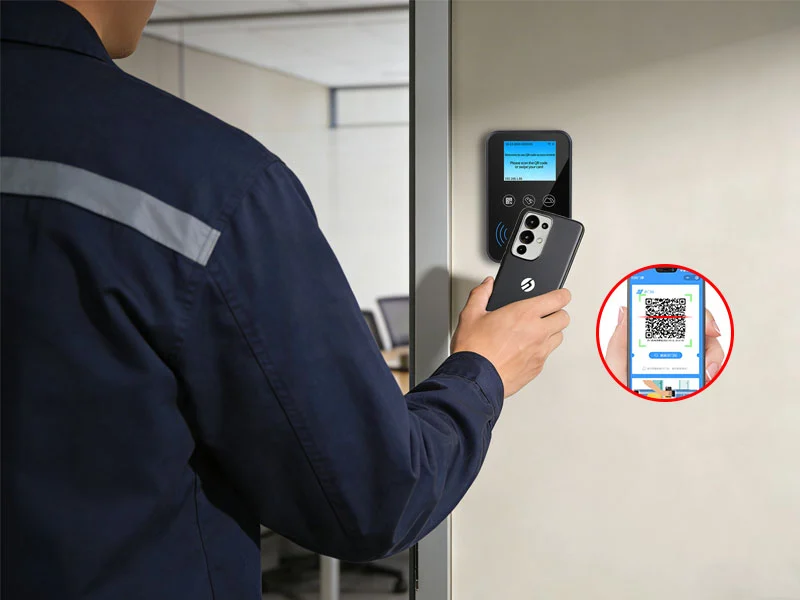
Scan the configuration code generated by the configuration tool with the QR code access control device to complete the setup.
Text:
The Cyberoce QR code door access control configuration tool is tailored for system integrators or software platforms with development capabilities.
I. The role of QR code door access control configuration tool in secondary development docking
Hardware configuration and debugging
Developers can set basic configurations such as the address, networking mode, communication protocol, and screen parameter settings for Qr code door access control and system backend connection with just one click through a graphical interface, without the need to send instructions one by one through code or serial port, greatly reducing the time for secondary development.
2. System integration and testing support
Before docking with the self-developed system, use a configuration tool to verify whether the various functions of the Qr code door access control hardware are normal (such as scanning code recognition, network communication, etc.).
3. Enable the necessary features for the project
Different projects have different requirements for access control functions (such as whether password verification is enabled, whether IC card sector encryption is enabled, whether devices use separate configuration passwords, etc.). The configuration tool provides corresponding functional options based on device models to ensure that developers can access all hardware functions.
II. The role of one click configuration of QR code door access control in practical project applications
Our company's Qr code door access control configuration can also merge multiple configuration codes into one configuration code. For example, in practical projects, a Qr code door access control all-in-one machine requires multiple configuration requirements for installation and debugging:
The backend server address is: https://www.sz-cerberus.net
The communication protocol used is HTTP protocol
The networking mode is WIFI, the username for WIFI is cyberoce, and the password is 123456
The door opening logic is: scan the code and then delay for 3 seconds to close the door
The screen standby text is: welcome
If each item generates a configuration code separately, it needs to be scanned continuously for more than 5 times on site, which is not only cumbersome to operate, but also prone to omission or disorder of order. More importantly, in the scenario of cross-border bulk deployment, this fragmented configuration method can easily lead to inconsistent device status, increasing the cost of after-sales service in the later stage. By using the Cyberoce configuration tool, a unified configuration code can be generated with just one click.
III. The specific steps for merging multiple configuration codes into one using QR code door access control are as follows:
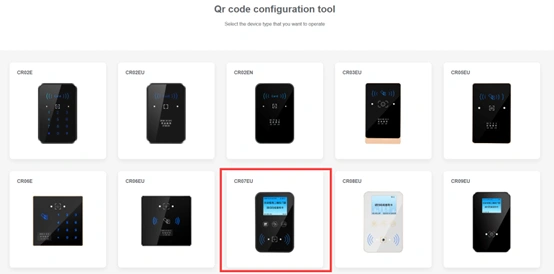
Open the configuration tool and select the specific QR code door access control model number. If CR07EU is selected, click on the CR07EU icon to enter.
On the main interface of the configuration tool, select the specific model of the QR code access control device.
2. Merge the above 5 configuration codes into one configuration code. The specific steps are as follows:
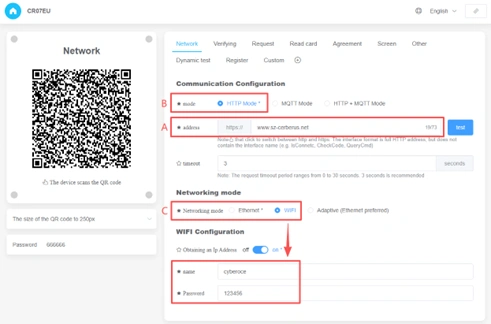
A、 In the CR07EU configuration interface, click on Network, select the asterisk "☆" in front of the address, and enter www.sz-cerberus.net in the address bar,
B、 Select HTTP Mode and check the asterisk "☆" before the mode,
C、 Select the asterisk "☆" in front of Networking mode, and also select WIFI. Fill in "cyberoce" for "name" and "123456" for "Password", and also select the asterisk "☆" in front of it, photo as below:
Enter multiple configuration parameters in the QR Code Access Control Configuration Tool.
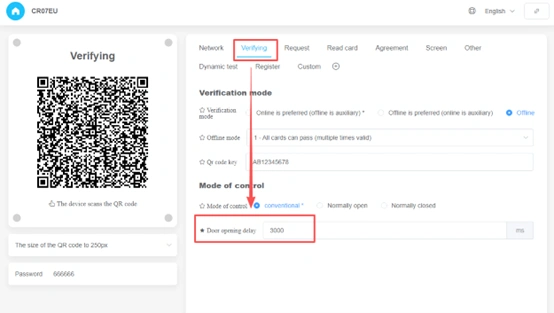
D、 Set the Door opening delay to 3000ms in the Verifying menu bar and select the asterisk "☆" in front of it, photo as below:
Enter the door opening delay time for the QR code access control system in the configuration tool.
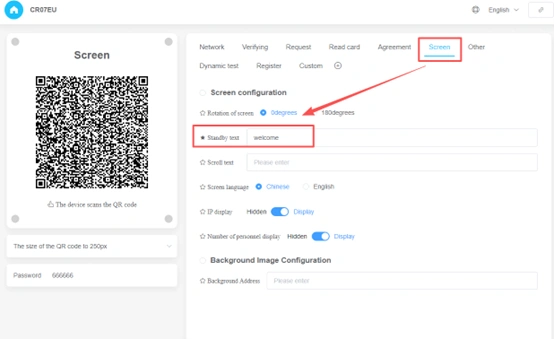
E、 Select the asterisk "☆" in front of Standby text in the Screen menu bar and fill in "welcome", photo as below:
Enter the English text to be displayed on the QR code access control screen during standby mode in the configuration tool.
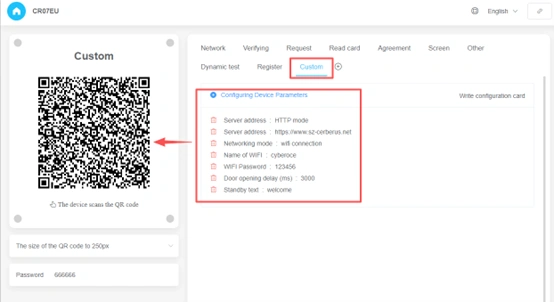
At this point, the configuration combination of A-E has been set. Next, click on Custom to check for any missing items in the Configuring Device Parameters. If there are no missing items, the configuration code on the left will be the combined code of the above 5 configuration codes. Photo as below:
Use the configuration tool to bundle multiple configured options into a custom selection and generate an access control configuration QR code
By scanning the unified merge code once on site, the equipment can complete all parameter writing and automatically restart within seconds, greatly reducing the workload of on-site construction personnel and improving work efficiency.
The project you are undertaking requires Qr code door access control, as well as the need to merge multiple configuration codes into one. You can search for "cyberoce" and contact our official customer service to request configuration for experience testing.

No comments:
Post a Comment